
gztools
Premium Smoke Brush Collection 2026 – 68 Procreate & Photoshop 4K Quality Brushes
or 4 interest-free payments of $0.75 with

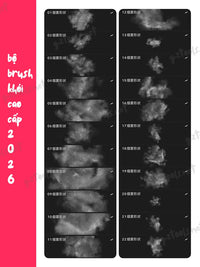
Professional smoke brush collection featuring 68 diverse brushes for Procreate and Photoshop, helping create ultra-realistic smoke, fog, mist, stea...
Read full description ->Professional smoke brush collection featuring 68 diverse brushes for Procreate and Photoshop, helping create ultra-realistic smoke, fog, mist, steam, and special atmospheric effects for digital art projects. With high resolution quality and meticulous design, this brush set is an indispensable tool for artists, graphic designers, and content creators.
OUTSTANDING FEATURES

Diverse Smoke Styles
This comprehensive collection includes 68 different brush types ranging from thin, delicate smoke to dense, heavy smoke, from smooth cloud formations to captivating swirl effects. Each brush is meticulously designed to simulate the natural movement of real smoke.
The variety covers every atmospheric need:
-
Light wispy smoke for subtle effects
-
Dense heavy smoke for dramatic impact
-
Soft cloud-like formations for gentle atmosphere
-
Dynamic swirling patterns for movement
-
Thin mist for mysterious ambiance
-
Thick fog for depth and mood
-
Steam effects for realism
-
Vapor trails for action scenes
Cross-Platform Compatibility
Procreate Support:
Compatible with .brush and .brushset formats for iPad
Optimized for Apple Pencil with full pressure sensitivity
Smooth performance on all iPad models running Procreate
Photoshop Support:
Compatible with .abr format for both PC and Mac
Works seamlessly with latest Photoshop versions
Full integration with Photoshop brush engine
Runs smoothly on the latest software versions of both platforms with no performance issues.
High Quality 4K Resolution
4K resolution ensures absolute sharpness, suitable for both print projects and digital work. Brushes support pressure sensitivity, creating natural effects when drawing. The high resolution means:
-
Crystal clear details even at large sizes
-
Professional quality for commercial projects
-
Perfect for both screen and print applications
-
No pixelation when scaled up
-
Maintains quality at any canvas size

PRACTICAL APPLICATIONS
Illustration & Concept Art
Create mysterious scenes with enveloping fog, chimney smoke effects, or backgrounds for fantasy art pieces. Brushes are ideal for sketching and building atmosphere in artwork.
Perfect for:
-
Fantasy landscape backgrounds
-
Sci-fi environment concepts
-
Character portrait atmosphere
-
Dramatic scene setting
-
Mystical and ethereal compositions
-
Environmental storytelling
Graphic Design
Add depth and drama to posters, banners, book covers, or album art. Smoke effects help create impressive focal points and capture attention.
Applications include:
-
Movie and music posters
-
Magazine covers
-
Product packaging
-
Social media graphics
-
Advertising campaigns
-
Brand identity materials
-
Event promotional materials
Photo Editing

Blend portraits with backgrounds naturally, create cigarette smoke effects, steam, or fog for landscape photos. Suitable for professional photographers and retouchers.
Enhancement uses:
-
Portrait atmosphere enhancement
-
Landscape mood creation
-
Fashion photography drama
-
Product photography depth
-
Wedding photo effects
-
Nature photography enhancement
-
Commercial photography polish
Digital Painting
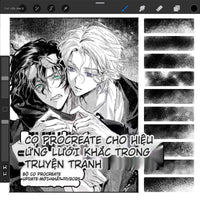
Enrich anime, manga, and fan art works with unique smoke effects. Combine multiple brush types to create more realistic effects.
Perfect for:
-
Anime and manga atmosphere
-
Character illustration backgrounds
-
Action scene effects
-
Fantasy creature environments
-
Game concept art
-
Animation backgrounds
HOW TO USE
Import Brushes to Procreate
Step-by-step installation:
-
Download .brushset file to iPad
-
Open file and select "Open with Procreate"
-
Brushes automatically import to library
-
Access via Brush icon to use
-
Organize into custom sets if desired
Import Brushes to Photoshop
Easy installation process:
-
Open Photoshop and go to Window > Brushes
-
Click menu in top right corner, select Import Brushes
-
Select downloaded .abr file
-
Brushes will appear in Brushes panel
-
Start creating immediately
TECHNICAL SPECIFICATIONS
Quantity: 68 diverse brushes
Formats: Procreate (.brushset, .brush), Photoshop (.abr)
Resolution: 4K – High quality
Features: Pressure sensitivity support
Categories: Thin smoke, dense smoke, fog, mist, steam, swirl smoke, special effects
File Size: Optimized for quick download
Compatibility: Procreate 5.0+, Photoshop CS6-CC 2024
Device Support: iPad with Apple Pencil, Wacom tablets, other pressure-sensitive devices
DETAILED BRUSH CATEGORIES
Thin Smoke Brushes:
Delicate, wispy effects for subtle atmospheric touches. Perfect for background ambiance and gentle mood setting.
Dense Smoke Brushes:
Heavy, thick smoke for dramatic impact. Ideal for fire scenes, industrial settings, or intense atmospheric effects.
Fog and Mist Brushes:
Soft, diffused effects for mysterious or romantic scenes. Great for landscape photography and fantasy illustrations.
Steam and Vapor:
Realistic steam effects for coffee cups, hot springs, or industrial settings. Adds authenticity to scenes.
Swirl and Dynamic Smoke:
Motion-filled smoke patterns for action scenes or magical effects. Creates sense of movement and energy.
Special Effects Brushes:
Unique atmospheric tools for creative experimentation. Push boundaries with unusual smoke formations.
EFFECTIVE USAGE TIPS
Optimize Effects
Combine multiple different brush types to create depth and realism in artwork. Adjust Opacity and Size to suit each detail.
Pro techniques:
-
Layer multiple smoke types for realistic depth
-
Vary opacity for natural transparency
-
Use different sizes for perspective
-
Combine with blending modes for integration
-
Adjust flow for subtle builds
-
Rotate brushes for varied directions
Brush Management
Create separate groups for smoke brushes for easy searching and use. Name clearly by effect type (thin smoke, dense smoke, fog, etc.).
Organization tips:
-
Create custom brush sets by type
-
Name brushes descriptively
-
Color code brush thumbnails
-
Remove unused variations
-
Keep frequently used brushes accessible
Backup Strategy
Export brush set as .brushset file for backup and transfer to other devices when needed. Protect your investment by maintaining copies.
WHY CHOOSE THIS BRUSH SET
Time-Saving Efficiency
Instead of manually painting smoke details for hours, just a few brush strokes create professional effects instantly. What used to take hours now takes minutes.
Professional Quality
Designed by professional artists, ensuring high realism and aesthetic quality. These aren't amateur brushes – they're production-ready tools used in commercial projects.
Easy to Use
No advanced skills required – even beginners can create impressive effects. The brushes do the heavy lifting while you focus on creativity.
Long-Term Value
One-time investment, use for countless projects afterward. Suitable for both personal and commercial purposes. The value compounds with every project.
PERFECT FOR
Digital artists and illustrators
Concept artists in game and film industries
Graphic designers creating marketing materials
Professional photographers and retouchers
Content creators for social media
Anime and manga artists
Fantasy and sci-fi illustrators
Book cover designers
Album art creators
Advertising agencies
Wedding photographers
Landscape photographers
Product photographers
Digital painting enthusiasts
Hobbyist artists exploring effects
WHAT YOU RECEIVE
68 professional smoke and atmospheric brushes
Multiple smoke density variations
Fog and mist effect tools
Steam and vapor brushes
Swirl and dynamic smoke patterns
Special effect atmospheric brushes
Both Procreate and Photoshop formats included
4K high-resolution quality
Pressure-sensitive brush response
Installation guides for both platforms
Instant digital download
Commercial use license included
LICENSE AND SUPPORT
License: Personal and commercial use permitted
Quality: Professional 4K resolution
Skill Level: Beginner to Professional
Updates: Compatible with latest software versions
File Delivery: Instant digital download
Customer Support: Installation and usage assistance available
CONCLUSION
The Premium 68 Smoke Brush Collection 2026 is an indispensable tool in every digital artist's arsenal. With diversity in styles, 4K quality, and cross-platform compatibility, this brush set will elevate your creativity to a completely new level. Download today on GZTools.net to experience the difference!
Transform ordinary artwork into atmospheric masterpieces with professional smoke effects that look hand-painted but take seconds to create. Whether you're working on concept art, photo retouching, graphic design, or digital painting, these 68 carefully crafted brushes provide the atmospheric effects you need to make your work stand out.
Complete Your Look
Frequently Bought Together
Bundle and save!
Premium Smoke Brush Collection 2026 –...
$3.00
30-day money-back guarantee
Customer Reviews
See what our customers are saying
No reviews yet
Be the first to review this product!
You May Also Like