
gztools
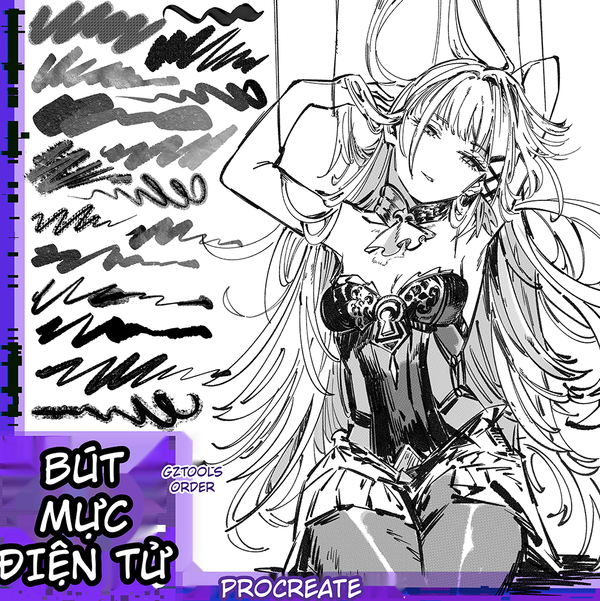
27 Crosshatch & Screen Tone Procreate Brush Collection for Comic Art
or 4 interest-free payments of $1.00 with

This collection of 27 specialized crosshatch and screen tone brushes designed exclusively for Procreate serves comic artists, manga creators, comic...
Read full description ->This collection of 27 specialized crosshatch and screen tone brushes designed exclusively for Procreate serves comic artists, manga creators, comic illustrators, and modern digital artists [query]. This toolkit optimally supports all professional crosshatch techniques, from fine lines to rough textures, diagonal crosshatching, spiral patterns, to characteristic gradient light-shadow effects in artistic comics [query].
Professional Comic Hatching System:
Complete crosshatch and tone toolkit covering all traditional manga and comic shading techniques digitally.
OUTSTANDING BRUSH FEATURES
Diverse Crosshatch Line Styles
This brush set possesses a complete range of crosshatch line types from basic to advanced, helping artists easily create light-dark dimensions, background textures, and material effects on every comic panel [query].
Crosshatch Variety:
-
Crosshatch brushes 1-20: Various diagonal, vertical, horizontal, multi-directional combined lines creating depth for shadows [query]
-
One-sided solid crosshatch brushes: Gradient effects transitioning from dark to light, perfect for character shading and environmental backgrounds [query]
-
Circular spiral crosshatch brushes: Create dynamic motion effects, swirling movements, suitable for psychological scenes or action scenes with strong visual appeal [query]
Complete Hatching Techniques:
From traditional parallel hatching to complex multi-directional crosshatching for professional depth and dimension.
Optimized For All Comic Styles
Suitable for Japanese manga, Chinese manhua, American comics, Korean webtoon [query].
Universal Comic Compatibility:
-
Japanese manga aesthetic
-
Chinese manhua traditions
-
American comic style
-
Korean webtoon production
-
Western graphic novels
-
Independent comics
Easy adjustment of pressure, size, opacity directly in Procreate without losing drawing quality [query].
Performance Optimized:
Pre-calibrated settings work immediately while remaining fully customizable for personal preference.
Compatible with all blend modes: Multiply, Overlay, Screen to create professional shadow effects [query].
Blend Mode Integration:
Professional integration with Procreate's blending system for natural shadow and lighting effects.
FUNCTION OF EACH BRUSH TYPE
Group 1: Basic Crosshatch Brushes (21 Brushes)
This is the main brush group, including standard crosshatch types for all comic panels [query]. Each brush is individually technically adjusted to create smooth, even strokes that don't break when zoomed in [query].
Basic Collection Features:
-
Crosshatch brushes 1-10: For light shading, distant backgrounds, misty fog effects [query]
-
Crosshatch brushes 11-20: For deep shadows, material texture, high light-dark intensity details [query]
Graduated Intensity:
Numbered system from light subtle tones to heavy dramatic shadows for complete tonal range.
Group 2: One-Sided Solid Crosshatch Brushes (6 Brushes)
This group is specially designed for creating natural light-dark gradient transitions [query]. With just one stroke, you can create a complete shadow area for characters or backgrounds [query].
Gradient Excellence:
-
Use for facial shading, body shadows, sky gradient transitions [query]
-
Saves shading time, increases creation efficiency 3 times compared to manual drawing [query]
Time-Saving Innovation:
Single-stroke gradient shading replaces tedious manual gradual tone building.
PRACTICAL APPLICATIONS IN COMIC DRAWING
Character Shadow Rendering
Use crosshatch brushes to create shadows for character faces, hair, clothing [query]. Simply select the appropriate brush, adjust light pressure and drag in the desired shadow direction, you'll instantly have professional crosshatch lines like famous manga works [query].
Character Application:
-
Facial structure and depth
-
Hair volume and texture
-
Clothing folds and fabric
-
Body dimensionality
-
Muscular definition
-
Skin tone variation
Background Scene Construction
Crosshatch brushes help create texture for backgrounds like building walls, ground surfaces, night sky, forest trees [query]. These effects prevent backgrounds from appearing flat, increasing depth and realism for panels [query].
Background Enhancement:
-
Architectural texture
-
Surface materials
-
Environmental atmosphere
-
Spatial depth
-
Natural elements
-
Scene complexity
Movement Effect Creation
Circular spiral crosshatch brushes help create movement effects, spirals, character psychological scenes, or high-speed action scenes [query]. This is a very popular technique in action genre manga [query].
Dynamic Effects:
-
Motion blur simulation
-
Speed indication
-
Psychological intensity
-
Energy visualization
-
Impact emphasis
-
Dramatic tension
EFFECTIVE USAGE GUIDE
Step 1: Import Brush Set Into Procreate
Open downloaded brush file, select Import into Procreate [query]. Organize brushes by group for easy management and use [query].
Installation Process:
Simple import and organization for immediate professional use.
Step 2: Adjust Brush Settings
Enter brush settings, adjust Size, Opacity, Flow according to drawing needs [query]. Test each brush on a new layer to understand each type's characteristics [query].
Customization Freedom:
While pre-optimized, full customization available for personal workflow preferences.
Step 3: Draw On Separate Layers
Always create separate layers for crosshatch portions for easier later editing [query]. Use Multiply or Overlay blend mode for more natural effects [query].
Non-Destructive Workflow:
Layer separation enables flexible editing and professional blend mode integration.
Step 4: Combine Multiple Brush Types
Combine crosshatch brushes with regular line brushes to create contrast [query]. Use light eraser to remove excess crosshatch areas, creating natural highlights [query].
Professional Technique:
Strategic combination and selective removal for sophisticated professional results.
BENEFITS OF OWNING THIS BRUSH SET
Time-Saving Efficiency:
Saves shadow drawing and background texture time up to 70% compared to manual drawing [query].
Production Speed:
Dramatic efficiency increase for professional production schedules.
Professional Quality:
Precise, uniform, professional strokes like published works [query].
Publication Standard:
Commercial-quality results suitable for professional publishing.
Style Flexibility:
Easy customization according to personal style, suitable for all comic genres [query].
Universal Application:
Adaptable across all comic styles and genres without limitation.
Device Compatibility:
Good compatibility with iPad, Apple Pencil, no lag or stuttering strokes [query].
Performance Reliability:
Smooth operation on standard iPad hardware with Apple Pencil.
PERFECT FOR
-
Beginner artists starting digital comic art, wanting to learn basic crosshatch techniques [query]
-
Professional artists needing optimal tools to increase work production efficiency [query]
-
Webtoon creators, fan art, book illustration, concept art needing versatile tools [query]
-
Art school students, digital painting classes [query]
Complete Your Look
Frequently Bought Together
Bundle and save!
27 Crosshatch & Screen Tone Procreate...
$4.00
30-day money-back guarantee
Customer Reviews
See what our customers are saying
No reviews yet
Be the first to review this product!
You May Also Like