
gztools
Sketch, Lineart & Hatching Manga Brush Set for CSP & Photoshop (Set 3) - 28 Professional Brushes
or 4 interest-free payments of $1.00 with

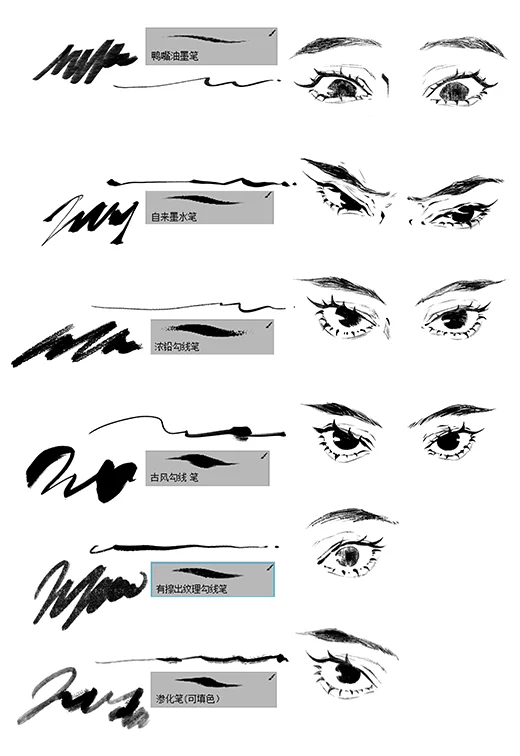
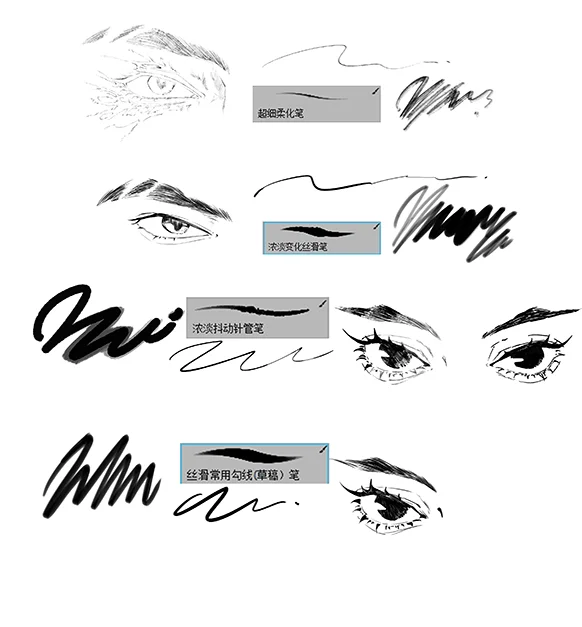
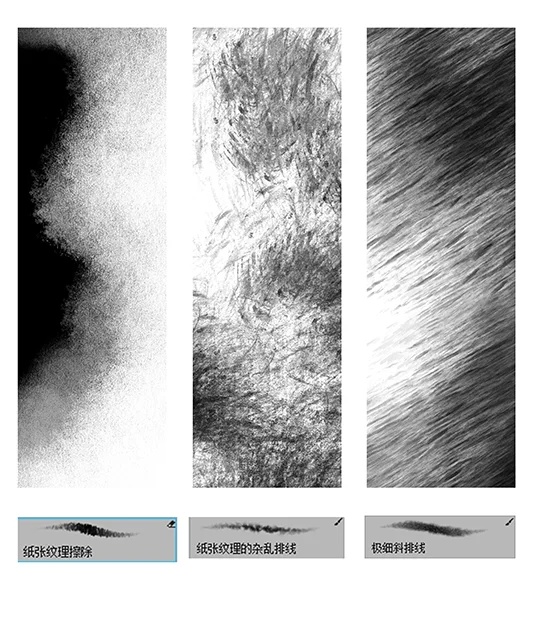
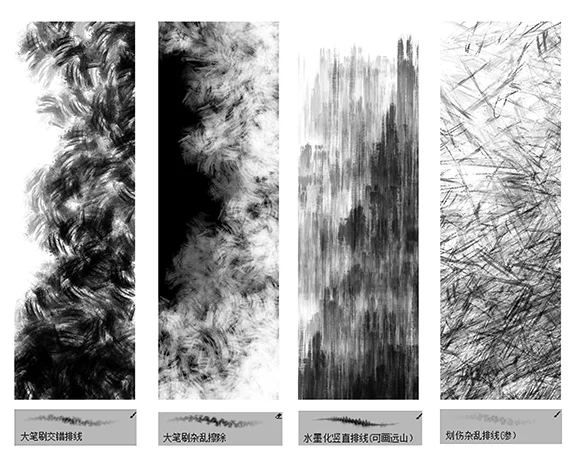
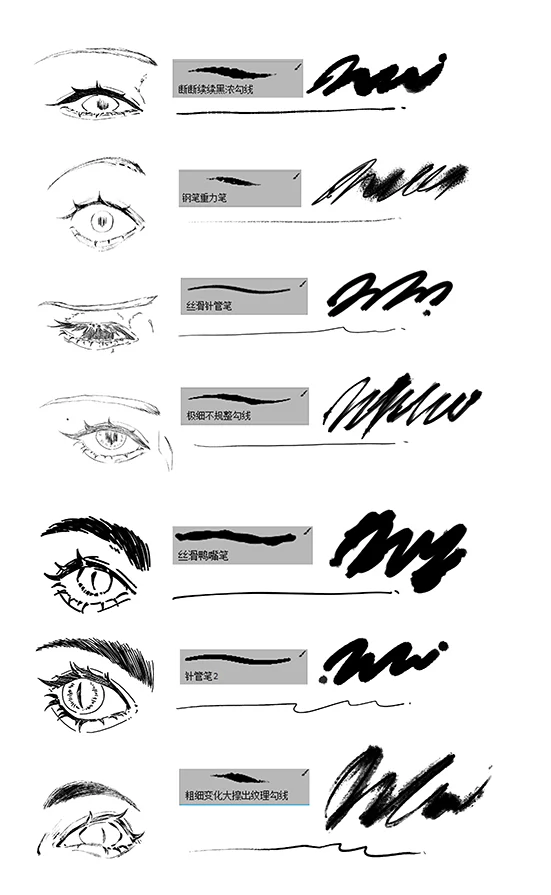
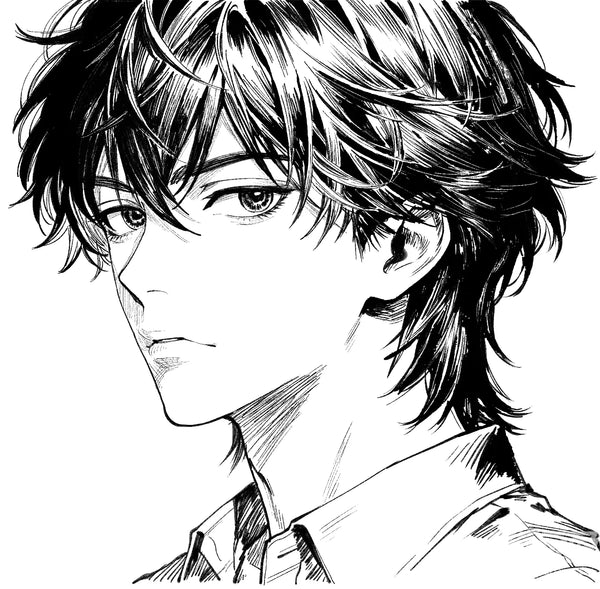
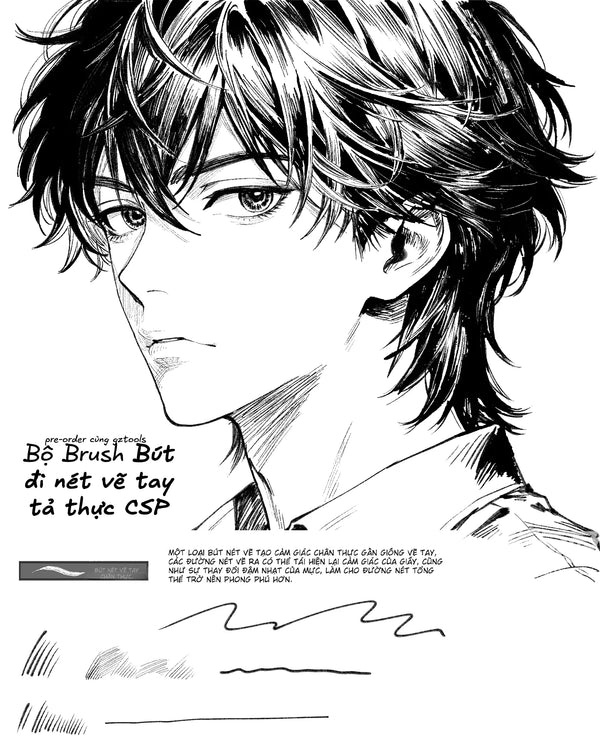
This custom-made brush collection includes a total of 28 professional brushes, carefully divided into specialized categories: 11 specialized Hatc...
Read full description ->This custom-made brush collection includes a total of 28 professional brushes, carefully divided into specialized categories:
-
11 specialized Hatching brushes
-
17 brushes for Sketching and Lineart
Specifically designed for comic drawing, manga production, and creating atmosphere and depth in artwork.
CROSS-PLATFORM COMPATIBILITY
Compatible with both domestic and international versions of Clip Studio Paint (CSP), with file formats .mtc and .sut. The Photoshop brush format is .abr.
Software Support:
-
Clip Studio Paint Pro and EX (all versions)
-
Clip Studio Paint domestic Chinese version
-
Clip Studio Paint international version
-
Adobe Photoshop CC and newer
-
Adobe Photoshop CS6 and compatible versions
HATCHING BRUSH COLLECTION (11 BRUSHES)
Traditional Manga Shading Technique:
Hatching is a fundamental manga and comic shading technique using parallel or cross-hatched lines to create tone, depth, and volume. This collection provides 11 specialized hatching brushes that replicate traditional hand-drawn manga shading techniques digitally.
Hatching Applications:
-
Character form and volume shading
-
Background atmospheric depth
-
Clothing and fabric texture
-
Shadow definition and gradation
-
Alternative to screen tones
-
Dimensional depth creation
-
Surface texture definition
-
Light and shadow contrast
Types of Hatching Brushes:
Parallel Line Hatching:
Single-direction parallel lines for basic shading and tone creation.
Cross-Hatching Variations:
Multiple angle cross-hatched lines for darker tones and complex shadows.
Contour Hatching:
Lines that follow form contours to emphasize three-dimensional volume.
Texture Hatching:
Varied line patterns for creating surface textures on objects, clothing, and environments.
Gradient Hatching:
Progressive line density for smooth tonal transitions.
SKETCH & LINEART COLLECTION (17 BRUSHES)
Complete Workflow Coverage:
From initial rough sketches to final clean lineart, this 17-brush collection covers every stage of manga and comic line work production.
Sketch Brush Categories:
Rough Draft Pencils:
Loose, expressive pencils for initial concept sketching and composition planning.
Construction Brushes:
Structured sketch tools for building character forms and establishing proportions.
Detailed Sketch Tools:
Refined pencil brushes for developing detailed preliminary drawings before inking.
Lineart Brush Categories:
Clean Ink Pens:
Precise, consistent line brushes for professional manga inking.
Variable Width Tools:
Pressure-sensitive brushes that create dynamic thick-thin line variation.
G-Pen Style:
Traditional manga G-pen simulation for authentic Japanese comic aesthetics.
Technical Line Tools:
Hard-edged brushes for mechanical objects, architecture, and panel borders.
Expressive Ink Brushes:
Organic, flowing ink tools for dynamic action scenes and emotional expressions.
MANGA PRODUCTION ADVANTAGES
Complete Workflow Integration:
This 28-brush set covers the entire manga production pipeline from initial concept to finished artwork.
Stage 1 - Sketching:
Use sketch brushes for rough drafts, character concepts, and panel layout planning.
Stage 2 - Refinement:
Apply detailed sketch tools to develop forms and establish final composition.
Stage 3 - Inking:
Execute clean lineart with specialized ink brushes for professional finish.
Stage 4 - Shading:
Implement hatching techniques to create depth, volume, and atmospheric effects.
Traditional Manga Aesthetics:
Authentic hand-drawn manga quality without requiring traditional tools or years of practice with real pen and ink.
ATMOSPHERIC DEPTH CREATION
Creating Professional Manga Atmosphere:
The combination of lineart and hatching brushes enables sophisticated atmospheric effects crucial for professional manga storytelling.
Atmospheric Techniques:
Environmental Depth:
Use graduated hatching density to create background recession and spatial depth.
Dramatic Lighting:
Apply concentrated hatching for bold shadows and high-contrast lighting scenarios.
Mood and Tone:
Vary hatching intensity to establish emotional atmosphere - light for cheerful, dense for ominous.
Texture Variety:
Different hatching patterns distinguish material surfaces - smooth for skin, rough for stone, flowing for fabric.
PERFECT APPLICATIONS
Manga Production:
Complete manga creation from sketch to final shading with authentic traditional techniques.
Comic Book Illustration:
Western comic production with professional sketching, inking, and shading tools.
Webtoon Creation:
Digital comic production with versatile brushes that work across manga and webcomic formats.
Character Design:
Professional character development from concept sketches to finished lineart.
Sequential Art:
Panel-based storytelling with consistent linework and professional shading.
Editorial Illustration:
Magazine and book illustration with manga-influenced aesthetic.
Concept Art:
Quick sketching and refined rendering for game and animation pre-production.
CROSS-PLATFORM BENEFITS
Work Across Software:
The same brush collection works in both Clip Studio Paint and Photoshop, allowing seamless workflow across different software environments.
Format Support:
-
.sut format for Clip Studio Paint native
-
.mtc format for CSP material collection
-
.abr format for Photoshop compatibility
Workflow Flexibility:
-
Start in CSP, finish in Photoshop
-
Use CSP for lineart, Photoshop for color
-
Maintain consistent brush feel across platforms
-
No relearning different brushes per software
TECHNICAL SPECIFICATIONS
Total Brush Count: 28 professional brushes
Hatching Brushes: 11 specialized shading tools
Sketch & Lineart: 17 drawing brushes
CSP Formats: .sut and .mtc
Photoshop Format: .abr
Compatibility: CSP domestic/international, Photoshop
Origin: Vietnamese artist custom creation
Style: Traditional manga techniques
Quality: Professional production grade
ADVANTAGES OF THIS COLLECTION
Comprehensive Coverage:
28 brushes provide complete manga workflow from sketch to shading without gaps.
Cross-Platform Compatibility:
Single purchase works in both CSP and Photoshop - maximum value and flexibility.
Hatching Specialization:
11 dedicated hatching brushes provide unmatched shading variety and depth creation capability.
Traditional Technique Digital:
Authentic manga shading methods without requiring traditional materials or skills.
Custom Vietnamese Creation:
Made by Vietnamese artist understanding specific needs of local digital manga community.
No Software Limitations:
Works across CSP domestic/international versions and all modern Photoshop releases.
PERFECT FOR
Manga artists and creators
Comic book illustrators
Webtoon producers
Sequential art specialists
Character designers
Editorial illustrators
Concept artists
Traditional manga enthusiasts
Digital manga students
Professional comic production
Independent manga publishers
Graphic novel creators
Anime-style illustrators
Cross-platform artists
CSP and Photoshop users
WHAT YOU RECEIVE
28 professional manga brushes
11 specialized hatching/shading brushes
17 sketch and lineart brushes
CSP format files (.sut and .mtc)
Photoshop format file (.abr)
Cross-platform compatibility
Complete workflow coverage
Traditional manga techniques
Atmospheric depth tools
Professional shading system
Installation files for both software
Commercial use license
USAGE WORKFLOW
Initial Sketching:
Select rough sketch brushes to establish composition and character poses quickly.
Sketch Refinement:
Use detailed sketch tools to develop forms, proportions, and final composition.
Clean Lineart:
Apply ink brushes for professional manga-style inking with dynamic line weight.
Hatching Shading:
Implement hatching brushes to create depth, volume, and atmospheric effects.
Final Details:
Add finishing touches with specialized texture and detail hatching patterns.
INSTALLATION GUIDE
For Clip Studio Paint:
-
Download .sut or .mtc files
-
Open Clip Studio Paint
-
Import brush files via Sub Tool palette
-
Brushes appear ready to use
-
Organize into custom sets if desired
For Photoshop:
-
Download .abr file
-
Open Photoshop
-
Go to Brush panel
-
Import .abr file
-
Brushes available in brush preset library
Complete Your Look
Frequently Bought Together
Bundle and save!
Sketch, Lineart & Hatching Manga Brus...
$4.00

30-day money-back guarantee
Customer Reviews
See what our customers are saying
No reviews yet
Be the first to review this product!
You May Also Like